
The fastest, lowest-risk way to handle payroll for contractors as a U.S. small business is to use a contractor-focused payment workflow that automates W-9 collection, ACH disbursements, and 1099-NEC generation. That single decision eliminates the three most common pain points: missing tax documents, year-end scrambles, and backup withholding surprises.
Here is what that approach delivers in practice:
- Compliance from day one. Collecting a completed Form W-9 before the first payment gives you the contractor's legal name and Taxpayer Identification Number (TIN), which are both required for accurate 1099-NEC filing.
- Faster payments, happier contractors. Roughly 80% of gig workers prefer platforms with faster payouts, and 54% want same-day access to funds. ACH and real-time payment rails make that possible without extra manual effort.
- Clean records year-round. Centralizing payments in one system means your 1099 totals are always current, not reconstructed from scattered invoices in January.
- Lower admin time. Automation handles TIN checks, payment scheduling, and 1099-NEC filing, replacing error-prone manual steps.
Three compliance items you cannot skip: collect the W-9 before any payment goes out, verify the TIN through the IRS TIN Matching program, and understand that an invalid or missing TIN triggers mandatory 24% backup withholding on every subsequent payment.
Table of Contents
- What should contractor payroll services do for your business?
- How much does contractor payroll cost, and when are things due?
- How do you set up payroll for a new contractor?
- What are the classification rules and compliance risks for contractors?
- Should you manage contractor payroll yourself or hire a provider?
- How does The Gap ProAdvisors handle contractor payroll for small businesses?
- Key Takeaways
- The Gap ProAdvisors makes contractor payroll straightforward
- FAQ
What should contractor payroll services do for your business?
A solid contractor payroll solution does more than cut checks. When you evaluate tools or providers, these are the capabilities that actually matter.
Core features to expect:
- W-9 collection and secure storage, with contractor self-onboarding so you are not chasing documents manually
- TIN verification through IRS TIN Matching before the first payment runs
- Multiple payment rails: ACH (standard 2–3 business days), same-day ACH, RTP/FedNow for near-instant transfers, and card payouts for contractors who prefer them
- Batch or mass payout capability so you can pay dozens of contractors in one action
- Invoice and expense matching to reconcile what was approved against what was paid
- 1099-NEC generation and e-filing, ideally with automatic threshold tracking
- Reporting and audit logs that show every payment, date, and amount
- Contractor portal access so workers can update their own banking and tax details
Integration expectations matter just as much as core features. Look for QuickBooks or Xero sync, AP/expense reconciliation, and API or CSV upload support for mass contractor lists. Without those connections, you will spend hours reconciling your payroll system against your books.
On the operational side, duplicate payment detection and payment hold windows protect you from costly errors. Dispute handling tools let you pause or reverse a payment when a contractor flags an issue, without disrupting the rest of your pay run.

Pro Tip: Prioritize platforms that automate TIN verification and 1099 generation together. Catching a bad TIN before you pay prevents backup withholding and avoids the correction filings that pile up at year-end.
How much does contractor payroll cost, and when are things due?
Pricing models explained
Contractor payroll pricing generally falls into four shapes. The right model depends on how many contractors you pay and how often.
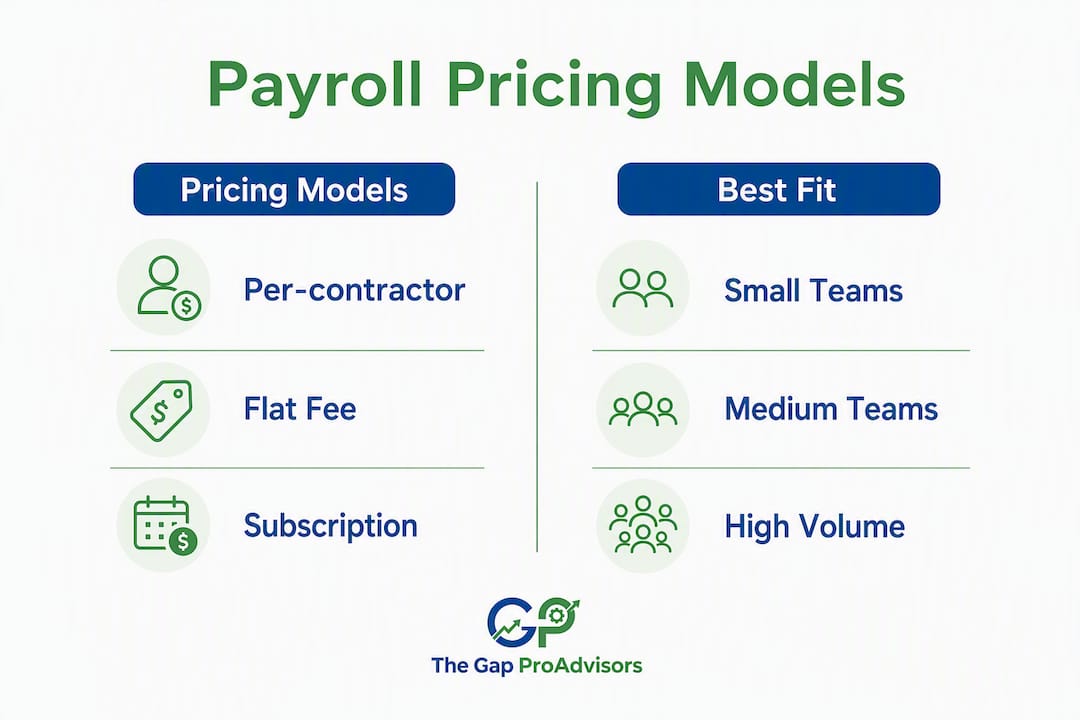
| Pricing Model | Typical Structure | Best Fit |
|---|---|---|
| Per-contractor per-pay | Small flat fee per contractor per pay run | Low-volume, irregular payments |
| Flat monthly fee | Fixed monthly rate covering a set contractor count | Predictable rosters, recurring payments |
| Percentage of payroll | Small percentage of total disbursements | High-volume, variable payment amounts |
| Per-transaction fee | Fee per payment processed | Occasional or one-off contractor payments |
Add-ons that affect your total cost include same-day ACH or RTP processing, 1099-NEC e-filing fees (sometimes bundled, sometimes charged per form), and international wire fees if you pay contractors outside the U.S. Entry-level tools tend to charge per contractor per month, while managed services typically bundle filing and support into a flat monthly retainer.
1099-NEC forms are due to both the contractor and the IRS by January 31 of the year following payment. That deadline applies whether you file electronically or by paper, and the IRS does not grant automatic extensions for late furnishing to contractors.
Beyond January 31, here are the milestones that shape your year:
- Before first payment: W-9 collected, TIN verified, contractor profile created in your system
- Each pay run: Invoice approved, payment initiated, record logged with date and amount
- Same-day/RTP cutoffs: Typically mid-afternoon on the payment date; check your provider's specific cutoff
- Q4 (October–December): Reconcile year-to-date totals against the 1099-NEC reporting threshold; confirm banking details are current for all active contractors
- January 31: Distribute 1099-NEC copies to contractors and file with the IRS
Reporting threshold note: The 1099-NEC filing threshold has been subject to legislative discussion. Always confirm the current threshold with the IRS directly before your year-end filing run.
How do you set up payroll for a new contractor?
Follow this checklist in order. Skipping steps, especially early ones, creates compliance problems that are expensive to fix later.
Pre-engagement steps
- Classify the worker correctly. The primary legal test centers on control. If you direct how, when, and where the work is done, the IRS and Department of Labor may treat the worker as an employee, not a contractor. Misclassification risks back taxes, penalties, and DOL scrutiny.
- Draft a written contractor agreement. Define the scope of work, payment terms, payment schedule, and deliverables. A clear agreement protects both parties and reinforces independent contractor status.
Onboarding documents
- Collect Form W-9 before the first payment. This is the single most important step. The W-9 gives you the contractor's legal name, business name, address, and TIN. Collecting it before payment is the "golden rule" to avoid a January tax scramble. For international contractors, collect the appropriate W-8 series form instead.
- Verify the TIN. Use the IRS TIN Matching program to confirm the TIN matches IRS records before you run the first payment. A mismatch triggers mandatory 24% backup withholding on all future payments until resolved.
System setup
- Create the contractor profile in your payroll or payment platform. Enter legal name, TIN, payment method, and default payment rail.
- Choose ACH as your default payment rail. ACH is low-cost, widely supported, and creates a clear payment record. Centralizing contractor payments in one system makes 1099 generation simpler and reduces manual entry.
- Enable contractor self-onboarding if your platform supports it. Contractors enter their own banking and tax details, reducing your data-entry burden and the risk of transcription errors.
- Set the payment schedule and confirm it matches the terms in your contractor agreement.
Running payments
- For single payments, approve the invoice, initiate the payment, and log the amount and date immediately.
- For batch payments, upload your contractor list via CSV or API, review the batch for duplicates, and confirm totals before releasing.
Year-end preparation
- Reconcile year-to-date payment totals for each contractor against the 1099-NEC threshold. Confirm that all W-9s are on file and TINs are verified.
- Generate and e-file 1099-NEC forms by January 31. Distribute copies to contractors by the same date.
Pro Tip: If a contractor was paid via credit card or a third-party processor like PayPal or Stripe, the processor typically files a Form 1099-K for those transactions. Do not also issue a 1099-NEC for the same amounts — that creates a double-reporting problem that can trigger IRS notices for both you and the contractor.
What are the classification rules and compliance risks for contractors?
Getting classification right matters more than any other step in contractor compensation management. Misclassifying an employee as a contractor exposes your business to back taxes, interest, penalties, and potential Department of Labor action.

The control test
The primary legal test centers on behavioral, financial, and relationship factors. Ask yourself:
- Behavioral control: Do you direct how the work is done, not just the result? Do you set the contractor's hours or require them to work on-site?
- Financial control: Does the contractor work for multiple clients? Do they invest in their own tools and equipment? Can they profit or lose money on the engagement?
- Relationship indicators: Is there a written contract? Does the contractor receive employee benefits? Is the relationship indefinite rather than project-based?
If your answers lean toward control, the relationship may be employment, not contracting.
Red flags that signal misclassification risk
- Directing specific hours or requiring daily check-ins
- Providing all tools, equipment, and workspace
- Exclusive, long-term engagement with no defined end date
- Offering benefits like paid time off or health insurance
- Micromanaging the process rather than evaluating the deliverable
Backup withholding and 1099-NEC obligations
When a contractor provides an incorrect or missing TIN, you are required to withhold 24% of each payment and remit it to the IRS. That is not optional. The only way to avoid it is to verify TINs before payments begin.
IRS guidance: The IRS TIN Matching program is a free, electronic tool that lets payers verify up to 25 TINs interactively or submit bulk files. Using it proactively before your first pay run is the most reliable way to prevent backup withholding and reduce year-end corrections.
For 1099-K vs. 1099-NEC clarity: when payments flow through card networks or processors, the processor handles 1099-K reporting. You should not issue a 1099-NEC for those same payments. Tracking which payment method you used for each contractor prevents this overlap.
Pro Tip: Keep a simple payment method log alongside your contractor records. One column for ACH payments (1099-NEC territory) and one for card/processor payments (1099-K territory) saves hours of reconciliation in January.
For official classification guidance, the California DIR's independent contractor FAQ and the IRS Form 1099-MISC and related guidance are authoritative starting points, though federal rules govern most U.S. engagements.
This article provides general information, not legal or tax advice. Confirm current thresholds, rules, and classification tests with the IRS or a qualified tax professional.
Should you manage contractor payroll yourself or hire a provider?
The honest answer: it depends on volume, internal capacity, and your tolerance for compliance risk.
A small roster with simple, infrequent payments can work fine with a DIY approach using a basic payment tool and a spreadsheet for 1099 tracking. Once you cross into recurring payments, multiple contractors, or any situation involving TIN mismatches, the manual approach starts costing more in time and risk than a managed service would cost in fees.
Decision checklist
Work through these questions before choosing your path:
- How many contractors do you pay, and how often?
- Does your team have the capacity to run TIN checks and track 1099 thresholds monthly?
- Do you need same-day or instant payouts to keep contractors satisfied?
- Does your accounting software need to sync automatically, or can you handle manual reconciliation?
- Have you had a missed TIN, a backup withholding event, or a late 1099 in the past two years?
If you answered "yes" to question 5, or "no" to questions 2 and 4, a managed or automated solution will pay for itself quickly.
DIY vs. outsourced: the real tradeoffs
DIY (self-managed with software):
- Lower monthly cost for small rosters
- Full control over payment timing and records
- You own the compliance burden: TIN checks, threshold tracking, 1099 filing
- Scales poorly when contractor count grows or payment frequency increases
- Year-end filing requires dedicated time and attention
Outsourced or managed service:
- Higher monthly cost, but compliance is handled for you
- Automation handles W-9 collection, TIN checks, payment scheduling, and 1099-NEC filing, reducing errors at scale
- Faster access to instant payout rails without building your own integrations
- U.S.-based support available when issues arise
- Frees your time for revenue-generating work
The clearest signal to switch from DIY to a provider: you have missed a 1099 deadline, received an IRS notice about backup withholding, or spent more than a few hours each January reconstructing payment records. For time-tracking integrations that feed into your payroll runs, tools like those reviewed on the HeyHive blog can help you evaluate timecard import options before committing to a platform.
How does The Gap ProAdvisors handle contractor payroll for small businesses?
The Gap ProAdvisors manages the full contractor payroll workflow for U.S. small businesses: W-9 and TIN collection, ACH and batch payment processing, 1099-NEC preparation and e-filing, QuickBooks Online sync, and year-round U.S.-based support. Everything runs through a secure online portal, so you have visibility into every payment and document without managing the process yourself.
What clients get from day one:
- W-9 sweep and TIN verification for all active contractors before the first pay run
- ACH and batch payment setup with clean records tied directly to your books
- 1099-NEC generation and e-filing handled by the team, with copies distributed to contractors by January 31
- QuickBooks Online integration so contractor payments reconcile automatically against your general ledger
- A dedicated U.S.-based advisor who knows your account, not a rotating support queue
The onboarding process is straightforward. After an initial discovery call, the team sets up your contractor profiles, connects your accounting software, and runs a document sweep to confirm all W-9s are on file. Most clients complete their first managed pay cycle within two weeks of signing on.
What small business owners consistently report: the biggest relief is not having to think about 1099s in January. When payments are tracked and TINs are verified throughout the year, year-end filing becomes a confirmation step rather than a crisis.
For businesses that also need 1099 contractor filing and compliance support beyond payroll, The Gap ProAdvisors handles that as part of the same service relationship, not as a separate engagement.
Key Takeaways
Managing contractor payroll correctly requires collecting a W-9 before the first payment, verifying the TIN, choosing ACH as your default payment rail, and filing 1099-NEC forms by January 31 every year.
| Point | Details |
|---|---|
| W-9 before first payment | Collect a completed Form W-9 before any payment goes out to avoid year-end tax problems. |
| TIN verification is mandatory | An incorrect or missing TIN triggers 24% mandatory backup withholding on all subsequent payments. |
| January 31 deadline | 1099-NEC forms must be furnished to contractors and filed with the IRS by January 31. |
| ACH as default rail | ACH payments create clean, traceable records and simplify 1099 threshold tracking year-round. |
| Mygappro manages it all | The Gap ProAdvisors handles W-9 collection, TIN checks, ACH payroll, and 1099-NEC e-filing for U.S. small businesses. |
What most small business owners get wrong about contractor payroll
Most of the stress around contractor payroll is not about the payments themselves. It is about the documentation that should have been collected before the first payment ever went out.
The pattern shows up constantly: a business owner pays a contractor for months, sometimes a full year, without a W-9 on file. January arrives, the 1099-NEC threshold has been crossed, and now there is a scramble to collect tax information from contractors who may no longer be responsive. Some provide incorrect TINs. Backup withholding kicks in retroactively in the form of IRS notices. What started as a simple payment relationship becomes a compliance headache that takes weeks to untangle.
The fix is not complicated. It is a process question, not a tax question. When W-9 collection, TIN verification, and payment tracking happen in the same system from the start, year-end is just a confirmation step. The businesses that struggle are the ones treating contractor payments like informal cash transactions and hoping the paperwork catches up later. It rarely does.
The Gap ProAdvisors makes contractor payroll straightforward
Paying contractors accurately and staying compliant with IRS reporting rules is manageable when you have the right support behind you. The Gap ProAdvisors gives small business owners a done-for-you contractor payroll solution that covers every step from W-9 collection to 1099-NEC e-filing, with QuickBooks sync and U.S.-based advisors who know your account.

Here is what getting started looks like:
- Discovery call (Week 1): You walk through your current contractor roster, payment methods, and any existing gaps in W-9 documentation.
- Setup and document sweep (Weeks 1–2): The team configures your contractor profiles, connects QuickBooks, and verifies TINs for all active contractors.
- First managed pay cycle (Week 2–3): ACH payments run through the system, records sync to your books, and you see exactly what was paid and when.
Within 30–60 days, your contractor payroll is fully organized: W-9s on file, TINs verified, payment history clean, and 1099-NEC tracking running automatically in the background.
Ready to stop managing this manually? Schedule a free consultation or explore the full range of bookkeeping, tax, and payroll services The Gap ProAdvisors offers to small businesses across all 50 states.
Useful sources
| Source | Why to consult it |
|---|---|
| IRS Form 1099-NEC and 1099-MISC guidance | Official filing instructions, thresholds, and deadlines for contractor reporting |
| IRS TIN Matching program | Best practices for using TIN Matching to prevent backup withholding |
| California DIR — Independent Contractor FAQ | Authoritative classification guidance; useful reference for behavioral and financial control tests |
| How to Pay Independent Contractors — Holdings | Practical W-9 and classification checklist for small business owners |
| Best Way to Pay 1099 Contractors — Routable | Payment rail options, payout speed data, and automation benefits |
| 1099-NEC Filing Deadlines — Papaya Global | Year-end filing timeline and January 31 deadline details |
FAQ
Do I need payroll software to pay contractors?
You are not legally required to use payroll software, but it significantly reduces your risk. Software automates W-9 collection, TIN verification, payment tracking, and 1099-NEC filing, all of which are your responsibility as the payer.
How do I set up payroll for a contractor?
Collect a completed Form W-9 before the first payment, verify the TIN through the IRS TIN Matching program, create a contractor profile in your payment system, and choose ACH as your default payment rail. File a 1099-NEC by January 31 for any contractor paid at or above the reporting threshold during the year.
The IRS requires 24% backup withholding when a contractor provides an incorrect or missing TIN. The withholding applies to all payments until the TIN issue is resolved.
Can I use QuickBooks to pay contractors and file 1099s?
Yes. QuickBooks supports contractor payment tracking and 1099-NEC preparation. For a fully managed setup that includes TIN verification, e-filing, and year-round bookkeeping support, Mygappro's contractor payroll service integrates directly with QuickBooks Online.
What is the difference between a 1099-NEC and a 1099-K?
A 1099-NEC is filed by the business that pays a contractor directly via ACH, check, or wire. A 1099-K is filed by a payment processor (such as PayPal or Stripe) when payments flow through their platform. Do not issue a 1099-NEC for amounts already reported on a 1099-K by a processor, as that creates a double-reporting problem.