
Projects in QuickBooks Online gives you one place to group a customer's job-specific invoices, expenses, and time entries so you can see income, costs, and profit for that job. If you already have QuickBooks Online Plus, Advanced, or Intuit Enterprise Suite, the next move is simple: confirm your plan, then turn on project financial tracking in Account and Settings.
Once you start assigning transactions, your project dashboard will show you:
- Total income and costs tied to that specific job
- Labor costs, whether from payroll or estimated hourly rates
- A running profit margin you can check any day, not just at tax time
Key Takeaways
Projects works because it groups every job's income, costs, and labor in one place, and it only delivers accurate numbers when two-sided items, burdened rates, and clean transaction assignment are set up correctly from the start.
| Point | Details |
|---|---|
| Confirm plan eligibility | Projects requires QuickBooks Online Plus, Advanced, or Intuit Enterprise Suite. |
| Enable before creating | Turn on project financial tracking under Account and Settings → Advanced first. |
| Choose costing mode carefully | Detailed costing is one-way, so decide Basic vs. Detailed before saving a project. |
| Assign every transaction | Unassigned invoices, bills, and time entries never appear in project reports. |
| Get professional setup | Mygappro configures burdened rates, two-sided items, and staff training for accurate job costing. |
Table of Contents
- What You Need Before You Start Using QuickBooks Online Projects
- How Do I Turn On Projects in QuickBooks Online?
- How to Create a New Project in QuickBooks Online
- How Do I Assign Transactions and Time to a Project?
- How Do I See Project Profitability in QuickBooks Online?
- How Do You Edit, Complete, or Delete a Project?
- Is QuickBooks Online Projects Right for Your Business?
- Sources
- FAQ
What You Need Before You Start Using QuickBooks Online Projects
Projects works on QuickBooks Online Plus, QuickBooks Online Advanced, and Intuit Enterprise Suite. QuickBooks Online Simple Start doesn't include it, so check your plan first if the menu option is missing. Advanced and Enterprise unlock extra features, including project estimates and estimate vs. actuals tracking, which Plus does not offer.
You'll also need company admin or accountant-level access. Standard users may not see the toggle in Account and Settings, so ask whoever manages your subscription to check permissions before you troubleshoot anything else.
Before creating your first project, spend twenty minutes on prep work:
- Clean up duplicate or outdated customer records
- Decide on a naming convention now, not after you've created ten projects
- Set up two-sided items if you plan to compare estimates against actuals
- Turn on Progress Invoicing if you bill in phases
Pro Tip: Skipping the naming convention step is the most common regret we hear. Pick a format like "Customer, Job Number, Street" before you create project one, not project fifteen.
How Do I Turn On Projects in QuickBooks Online?
Projects is generally enabled by default in QuickBooks Online Plus and Advanced, but you should still confirm it's active before you start building.
- Click the Gear icon, then select Account and Settings.
- Go to the Advanced tab.
- Find the Projects section and click the pencil icon to edit.
- Turn on Use project financial tracking.
- Click Save, then Done.
Once it's active, a Projects menu item appears under All apps. If you're on QuickBooks Online Accountant managing a client file, the path is identical, though you'll access it from within that client's company. Intuit Enterprise Suite handles activation similarly, but confirm your onboarding specialist has flipped the setting during setup.
Pro Tip: On some account types, once you turn on project tracking, you can't turn it back off. If your account uses retainage receivable or payable, map those accounts correctly during activation because fixing a bad mapping later is far more tedious than getting it right the first time.
How to Create a New Project in QuickBooks Online
With tracking enabled, creating a project takes about a minute.
- Go to All apps, then Projects.
- Click New project.
- Enter a project name, select the customer, and add optional start and end dates.
- Set the status (In progress, for most new jobs).
- Add notes, billing address, or shipping address if relevant.
- Click Save.
Before you save, decide on your costing mode. Basic costing tracks income and expenses at the project level, which suits simple jobs. Detailed costing adds phases and more granular tracking, but the switch only runs one direction. You can't downgrade a Detailed project back to Basic later.
Phases and milestones matter most if you bill in stages, like a remodel with a demolition phase, a framing phase, and a finish phase. Breaking a job into phases lets you compare estimated costs against actual costs at each stage instead of waiting until the whole job wraps.
A naming format like "Martinez, Job 204, Oak Street" keeps your project list scannable once you're managing a dozen jobs at once.
Pro Tip: Add the year to recurring customer projects, like "Martinez 2026 Remodel," so old and new jobs for the same client don't get confused in your reports.
How Do I Assign Transactions and Time to a Project?
A project is only as useful as the transactions you assign to it. Anything left unassigned simply won't show up in your project reports, no matter how carefully you built the project itself.
For new transactions, it's straightforward:
- When creating an invoice, bill, or expense, select the customer, then choose the specific project from the same dropdown.
- QuickBooks nests the project under the customer name automatically once one exists.
For time tracking, QuickBooks Time and QuickBooks Workforce integrate directly with Projects, letting employees clock hours against a specific job from their phone or a shared kiosk. Set hourly cost rates before your team starts logging time, or your labor cost figures will be inaccurate from day one.
For existing transactions, you can retroactively assign them to a project, but paid invoices need caution. Editing an invoice already linked to a payment can break that payment link and mark the invoice unpaid again. Before editing any paid invoice, turn off "Automatically apply credits" in settings first.
For expenses paid on behalf of a client, check the billable box and write a specific description, like "lumber, framing phase" rather than "materials." Vague descriptions are the top cause of misallocated costs we see in client files.

Pro Tip: If you're assigning dozens of transactions weekly, look at automation tools built on the Projects API rather than doing it by hand every Friday.
How Do I See Project Profitability in QuickBooks Online?
Your project dashboard and a handful of reports do the real work of turning transaction data into decisions.
The reports worth checking regularly:
- Project Profitability Summary: income, costs, and margin at a glance across all projects
- Project Profitability Detail: line-item breakdown for a single job
- Time by Employee and Project: hours logged per person, per job
- Project Costs Detail: every expense and bill tied to a project
If you're on Advanced or Enterprise, project estimates let you compare estimate vs. actuals directly on the project dashboard, showing whether a job is running over budget while there's still time to correct course.
On the project dashboard, expect to see: total income to date, total costs to date, and a profit margin percentage, updated as transactions post.
For labor costs, you can toggle between payroll expenses and estimated hourly costs. Payroll expenses post after your payroll run and reflect exact figures. Estimated hourly costs show up immediately, giving you near-real-time visibility between pay periods, though the numbers are approximations until payroll actually runs.
How Do You Edit, Complete, or Delete a Project?
Managing an active project list means knowing which actions are reversible and which aren't.
- Open All apps → Projects, then select the project.
- Click Edit to change the name, dates, or notes.
- Change the status to Completed when the job wraps, or Canceled if it falls through.
- To delete, open the project and select Delete. This removes it permanently from your project list.
A few things to keep in mind:
- Deleted projects don't come back. Mark a finished job as Completed instead of deleting it if you want the historical data later.
- Timesheets tied to a deleted project are sometimes retained in payroll records even after the project itself is gone.
- Permission levels (Off, View Only, Create/Edit) are set per user under your company's user management settings, not inside the Projects screen itself.
Archive, don't delete, unless you're certain you'll never need that job's history for a tax question or a client dispute.
Is QuickBooks Online Projects Right for Your Business?
Projects earns its keep for service businesses, contractors, and agencies, where job-specific profitability is the whole point of doing the bookkeeping in the first place. A remodeling contractor with five active jobs needs to know which one is bleeding money before the job closes, not after.
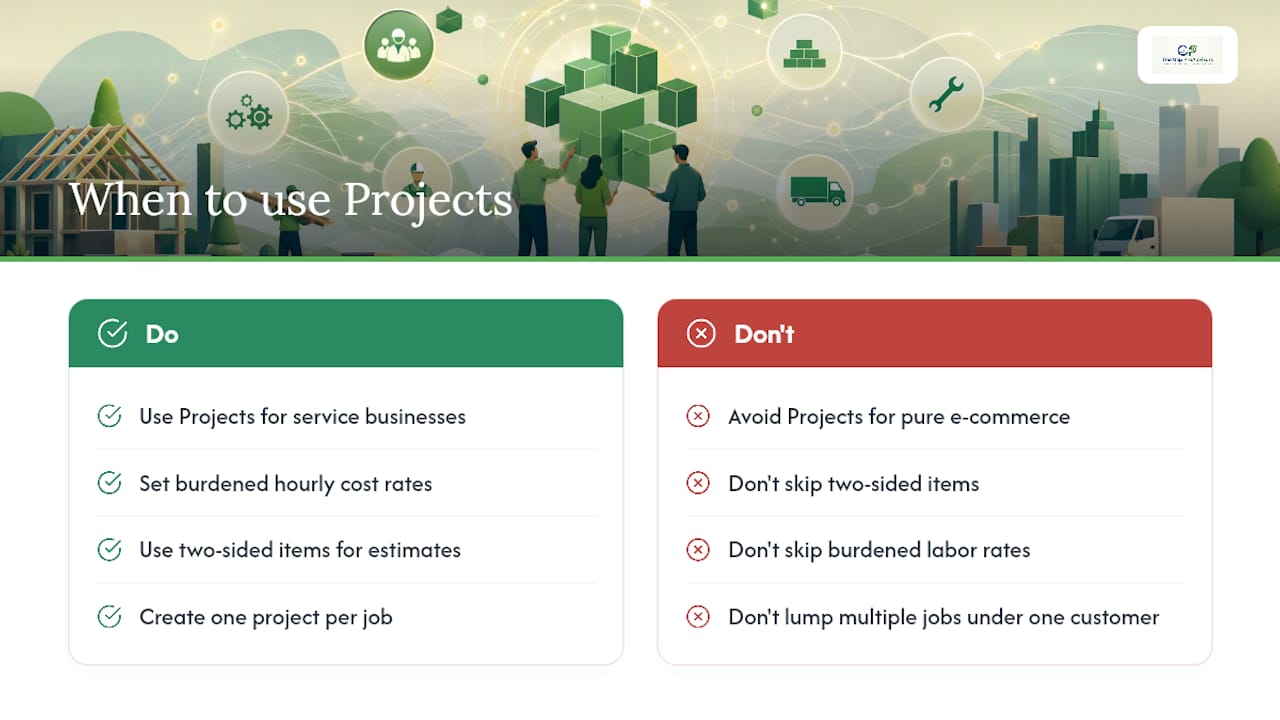
Pure e-commerce sellers often get less value from Projects. If your business model runs on channel-level profit (Amazon versus your own storefront versus wholesale), tracking by sales channel tells you more than tracking by customer job ever will.
For contractors and service businesses that do adopt Projects, three habits separate clean books from misleading ones: set burdened hourly cost rates that include payroll taxes and overhead, use two-sided items so estimate vs. actual comparisons mean something, and create one project per job rather than lumping multiple jobs under one customer.
Two-sided items and burdened labor rates are the setup steps most owners skip, and they're exactly the steps that make your profit margin numbers trustworthy instead of misleading.
Pro Tip: Review project profitability weekly, not monthly. A job running over budget is much easier to fix in week two than in week eight.
How The Gap ProAdvisors Helps Clients Set Up Projects
We set up Projects for clients from the ground up: mapping two-sided items, configuring burdened hourly cost rates, and training staff on assigning transactions correctly from day one. One contractor client now checks job margins every Monday morning instead of guessing until year-end, with fixed-fee invoices tied cleanly to each project phase. A professional setup upfront prevents the two errors we see most often: retroactively editing paid invoices and mis-mapped two-sided items that quietly wreck estimate-vs-actual reports.
Get Help Setting Up QuickBooks Projects the Right Way
If reading through activation steps, costing modes, and burdened labor rates left you wanting someone else to just handle it, that's exactly what we do at Mygappro. Our team sets up Projects correctly the first time, so you're not untangling mis-mapped items or broken invoice links six months from now.
Our QuickBooks Projects setup service covers the parts owners most often get wrong: two-sided item mapping, burdened hourly cost configuration that actually includes overhead and payroll taxes, QuickBooks Time integration for field staff, and hands-on training so your team assigns transactions correctly without calling us every week. We also handle ongoing bookkeeping once Projects is running, so the reports stay clean month after month.
Start with a Free QuickBooks Online Health Check to see exactly where your current setup stands, or go straight to our remote bookkeeping services page if you already know you want ongoing support.
Sources
- How to Use QuickBooks Online Projects for Any Business Type
FAQ
How Do You Enable the Projects Feature in QuickBooks Online?
Go to the Gear icon, select Account and Settings, click the Advanced tab, then turn on "Use project financial tracking" under the Projects section and save.
What's the Difference Between Projects and Classes in QuickBooks Online?
Projects group all transactions for one specific job or customer engagement, while classes categorize transactions across broader business segments like department or location; many businesses use both together for layered reporting.
How Do I Use QBO Projects Day to Day?
Assign every invoice, bill, expense, and timesheet to its project as you create it, then check the Project Profitability Summary report weekly to catch cost overruns early.
Why Do Some Accountants Have Reservations About QuickBooks Online?
Concerns usually center on the learning curve of moving from desktop software and on setup mistakes, like skipping two-sided items or burdened labor rates, that make project reports unreliable rather than the platform itself. A professional setup through a service like Mygappro's bookkeeping team resolves most of these issues before they start.