
TL;DR:
- QuickBooks Payroll is ideal for businesses already using QuickBooks Online, offering seamless ledger posting. Gusto provides comprehensive HR tools like onboarding and benefits, while The Gap ProAdvisors offers managed payroll and bookkeeping services for full outsourcing. The best choice depends on your accounting setup, HR needs, and preference for handling payroll yourself or through a managed provider.
If your books already live in QuickBooks Online, QuickBooks Payroll is the most efficient choice. If you need HR tools alongside payroll, Gusto delivers more value. And if you'd rather hand payroll and bookkeeping off entirely, The Gap ProAdvisors offers a managed payroll and bookkeeping service that handles it all for you.
Here's the short version of who wins each scenario:
- QuickBooks Payroll — best for businesses already using QuickBooks Online that want payroll entries posted directly to the general ledger, no connector required.
- Gusto — best for small businesses that need onboarding, PTO, benefits administration, and HR tools bundled with payroll in one platform.
- The Gap ProAdvisors (Mygappro) — best for owners who want accurate books, IRS-compliant payroll filings, and year-end readiness without running the software themselves.
Both QuickBooks Payroll and Gusto offer unlimited payroll runs and full-service tax filing across the U.S. The real difference is focus: one is an accounting-integrated payroll add-on, the other is a people operations platform where payroll is the foundation.
Table of Contents
- QuickBooks Payroll vs Gusto: Side-by-Side Comparison
- How each platform performs on payroll, HR, and extras
- Plans, fees, and what you'll actually pay each month
- How each option fits into your accounting stack
- Onboarding, implementation, and switching checklist
- Security, data protection, and payroll compliance
- Decision checklist: which option fits your business?
- When a managed payroll partner beats self-service software
- Final recommendation and next steps
- Key Takeaways
- Why some small businesses are better off with a managed approach
- The Gap ProAdvisors handles payroll so you don't have to
- Sources and further reading
- FAQ
QuickBooks Payroll vs Gusto: Side-by-Side Comparison
The table below compares all three options across the dimensions that matter most when choosing payroll for a small business.
| Dimension | The Gap ProAdvisors | Gusto | QuickBooks Payroll |
|---|---|---|---|
| Best for | Owners who want done-for-you payroll, bookkeeping, and tax support | HR-first SMBs needing onboarding, PTO, and benefits in one platform | QBO users who want native ledger posting and fast deposits |
| Pricing | Custom quote; recurring monthly subscription | $52/mo (Simple); $200/mo (Plus) | $45/mo (Core); $80/mo (Premium); $375/mo (Elite) |
| Payroll features | Managed runs, direct deposit, contractor 1099s, W-2s | Unlimited runs, direct deposit, contractor 1099s, W-2s | Unlimited runs, same-day or next-day direct deposit, contractor 1099s, W-2s |
| Tax filing & penalty protection | Proactive compliance; penalty mitigation through integrated bookkeeping | Automated federal and state filing; no penalty protection guarantee | Automated federal and state filing; tax penalty protection up to $25,000/year on Elite plan |
| Deposit speed | Depends on payroll schedule | Next-day (Plus); standard (Simple) | Same-day (Premium/Elite); next-day (Core) |
| HR features | Payroll + bookkeeping + tax as a managed bundle | Onboarding, offer letters, PTO, e-signatures, org chart, benefits brokerage | Limited HR; benefits via third-party carriers; HR advisor on Elite only |
| Integrations | QuickBooks Online support included | QuickBooks Online, Xero, FreshBooks, BambooHR, and others | Native QuickBooks Online posting; limited third-party accounting integrations |
| Support & onboarding | Dedicated advisor; white-glove managed onboarding | Migration support; automated setup; chat and phone | White-glove setup on Premium; dedicated payroll expert on Elite |
| Security & compliance | Secure online portal; proactive year-round compliance | SOC 2 certified; automated compliance alerts on Premium | Intuit security infrastructure; compliance tools on higher tiers |
Pricing callout: Entry-level costs for DIY platforms are comparable for a two-person team on either platform. At 10 employees, QuickBooks Payroll Core costs about the same as Gusto Simple, with pricing differences small enough that feature fit matters more. The Gap ProAdvisors pricing is custom, and includes bookkeeping and tax support that would otherwise require separate subscriptions.
How each platform performs on payroll, HR, and extras
Payroll core: what you actually get
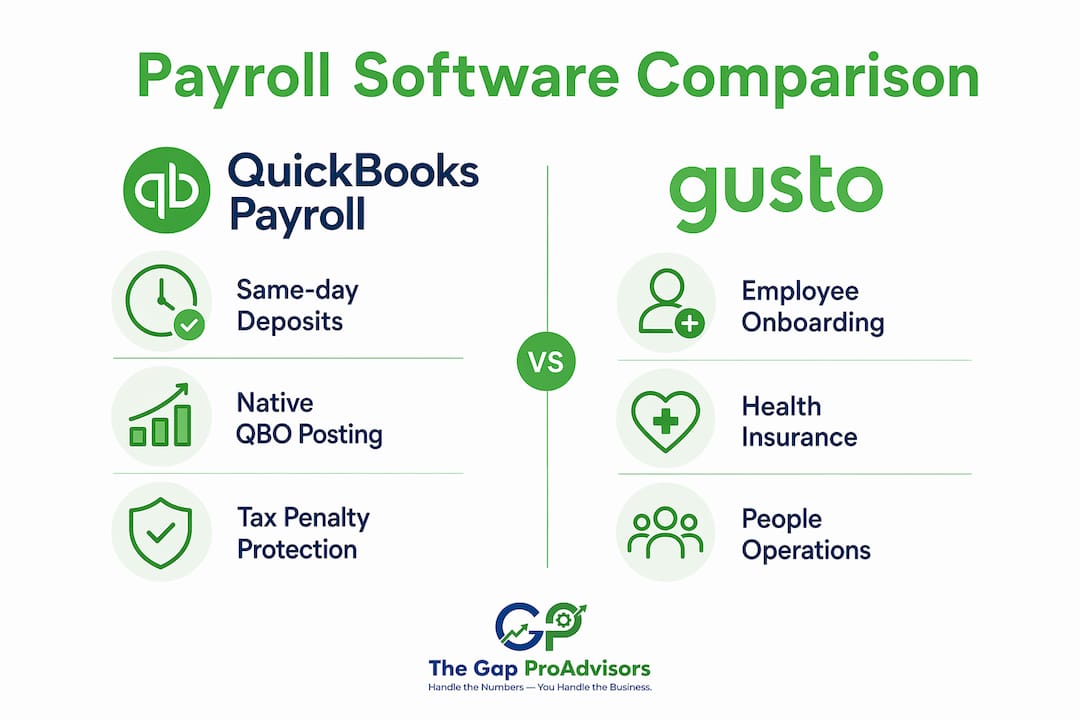
QuickBooks Payroll and Gusto are closely matched on the fundamentals. Both run payroll automatically, file federal and state taxes, handle direct deposit, and generate year-end W-2s and 1099s for contractors. The meaningful differences show up in deposit speed and compliance guarantees.

QuickBooks Payroll's Elite plan includes tax penalty protection covering a capped amount annually in payroll tax penalties, regardless of the error source. Gusto does not offer a comparable guarantee. For a Kansas small business owner who has ever received an IRS notice over a missed payroll tax deposit, that protection has real dollar value.
Gusto's deposit speed tops out at next-day on the Plus plan. QuickBooks Payroll offers same-day direct deposit on Premium and Elite, which matters if your cash flow is tight and you're running payroll close to payday.
HR features: where Gusto pulls ahead
Gusto is built as a people operations platform, not just a payroll processor. The Plus plan includes employee onboarding workflows, customizable PTO policies, e-signatures, offer letter templates, an employee directory, and a time-tracking tool that syncs directly with payroll. These features are either absent or locked behind higher tiers in QuickBooks Payroll.
Benefits administration is another clear differentiator. Gusto includes health insurance brokerage directly in the platform, letting you shop and administer medical, dental, and vision plans without leaving the app. QuickBooks Payroll routes benefits through third-party carriers and restricts its HR advisor to the Elite tier.
For a Kansas business with five to fifteen employees where one person handles both HR and bookkeeping, Gusto's bundled approach reduces the number of tools you need to manage.
Extras: time tracking, job costing, and mobile
QuickBooks Payroll integrates with QuickBooks Time for employee hour tracking, and its advanced tiers connect payroll to job costing tools. For project-based businesses, that job-level labor cost tracking is more operationally useful than anything Gusto offers at a comparable price.

Customer reviews on G2 and Reddit generally rate Gusto higher for ease of use and onboarding experience. QuickBooks Payroll reviewers praise the accounting sync but report a steeper learning curve for non-accountants. Both platforms offer mobile apps; QuickBooks Time's mobile clock-in is particularly well-regarded for remote and field teams.
Pros and cons at a glance:
QuickBooks Payroll
- ✅ Native QuickBooks Online posting eliminates journal-entry work
- ✅ Same-day direct deposit on higher tiers
- ✅ Tax penalty protection up to $25,000/year on Elite
- ✅ Strong job costing and time-tracking integration
- ❌ Limited HR features at entry tiers
- ❌ Steeper learning curve for non-accountants
- ❌ Benefits administration requires third-party carriers
Gusto
- ✅ Full HR suite: onboarding, PTO, e-signatures, offer letters
- ✅ In-platform health insurance brokerage
- ✅ Easier to use for non-accountants
- ✅ Contractor-only plan available at $6/contractor/month, no base fee
- ❌ No tax penalty protection guarantee
- ❌ QuickBooks Online sync works well but requires connector configuration
- ❌ Multi-state payroll only on Plus and above
Pro Tip: If your bookkeeper reconciles payroll monthly, ask your payroll vendor how journal entries post to your chart of accounts. A connector-based sync (like Gusto pushing entries into QuickBooks Online) can break silently after a product update, leaving your books out of balance until the next reconciliation. Native QuickBooks Payroll posting eliminates that risk entirely.
Plans, fees, and what you'll actually pay each month
Pricing breakdown
| Platform | Base fee | Per-employee fee | Notable add-ons |
|---|---|---|---|
| Gusto Simple | $52/mo | $6/person | Single-state payroll, W-2s, 1099s, basic HR |
| Gusto Plus | $80/mo | $12/person | Multi-state, next-day deposit, PTO, time tracking |
| Gusto Premium | $200/mo | — | HR experts, compliance alerts, priority support |
| Gusto Contractor-only | — | $6/contractor | No W-2 employees; 1099s only |
| QuickBooks Payroll Core | $45/mo | $6/employee | Full-service payroll, next-day deposit |
| QuickBooks Payroll Premium | $80/mo | $8/employee | Same-day deposit, white-glove setup, HR support |
| QuickBooks Payroll Elite | $375/mo | $10/employee | Tax penalty protection, dedicated payroll expert, HR advisor |
| The Gap ProAdvisors | Custom quote | Included in subscription | Bookkeeping, tax prep, QuickBooks support bundled |
Note: QuickBooks Payroll pricing shown reflects current published rates. Intuit periodically offers promotional discounts for the first few months.
Sample monthly cost scenarios
-
2-person team: Gusto Simple = $52/month. QuickBooks Payroll Core = $57/month. The difference is minimal; the decision should rest on features, not price.
-
10-person team: Gusto Simple = $100/month. QuickBooks Payroll Core = $105/month. Gusto Plus = $200/month. QuickBooks Payroll Elite = $450/month. At this size, the tier you choose matters more than the platform.
-
25-person team: Gusto Plus = $380/month. QuickBooks Payroll Premium = $280/month. QuickBooks Payroll Elite = $625/month. At 25 employees, QuickBooks Payroll Premium becomes the most cost-efficient option if you don't need Gusto's HR depth.
Hidden costs to watch for
- Multi-state payroll: Gusto charges for multi-state only on Plus and above. QuickBooks Payroll includes it across all tiers but may charge additional state fees.
- Workers' compensation: Both platforms offer workers' comp integrations, typically through third-party carriers at additional cost.
- Benefits brokerage fees: Gusto's health insurance brokerage is built in, but carrier premiums are separate. QuickBooks Payroll routes benefits through Allstate Health Solutions with over 200 carriers.
- Time tracking: QuickBooks Time is an add-on cost unless bundled with your QuickBooks plan. Gusto includes basic time tracking on Plus.
- Field crew time tracking: If your team works off-site, a dedicated time-tracking tool like ClockHQ can simplify hour exports to either payroll platform.
How each option fits into your accounting stack
The accounting integration question is where most small business owners make the wrong call. They compare feature lists and pricing, then overlook the 30–60 minutes per month their bookkeeper spends fixing payroll sync errors.
Native posting vs. connector-based syncs
QuickBooks Payroll posts payroll, taxes, and liabilities automatically into the QuickBooks Online general ledger with correct account mapping. No import, no export, no journal-entry work. Wages, tax withholdings, and employer liabilities land in the right accounts the moment payroll runs.
Gusto's QuickBooks Online integration works through a connector. It syncs payroll journal entries automatically and works reliably most of the time. The practical risk: connector-based syncs can fail after product updates, and when they do, your books drift until someone catches it. Teams using Gusto with QuickBooks Online should schedule monthly reconciliation checks and document their default account mappings.
Which accounting systems each platform supports
- QuickBooks Payroll: Designed exclusively for the Intuit ecosystem. If your books are in Xero, FreshBooks, or Wave, QuickBooks Payroll is not a practical option.
- Gusto: Integrates with QuickBooks Online, Xero, FreshBooks, BambooHR, and a range of time-tracking tools. It functions as a standalone platform and does not require any accounting software subscription.
- The Gap ProAdvisors: Provides QuickBooks Online support as part of the managed service, meaning your payroll and books are reconciled together by the same team.
Bookkeeping tips to reduce reconciliation time
- Map payroll accounts in your chart of accounts before the first payroll run, not after.
- Reconcile payroll liability accounts monthly, not quarterly.
- If you use a connector sync, set a calendar reminder to verify the connection after any platform update.
- Consider a QuickBooks cleanup before switching payroll providers to start with a clean ledger.
Integration pros and cons:
| QuickBooks Payroll | Gusto | The Gap ProAdvisors | |
|---|---|---|---|
| Native QBO posting | ✅ Yes | ❌ Connector only | ✅ Managed by advisor |
| Works without QBO | ❌ No | ✅ Yes | ✅ Yes |
| Reconciliation risk | Low | Moderate | Low (managed) |
| Multi-accounting platform support | Limited | Broad | QuickBooks Online focused |
Onboarding, implementation, and switching checklist
Switching payroll providers mid-year is manageable, but it requires careful preparation. The biggest risk is incorrect year-to-date figures, which cause W-2 errors and potential IRS notices.
Migration checklist
- Export year-to-date payroll registers from your current provider, including gross wages, tax withholdings, and employer contributions for every employee.
- Gather federal and state tax ID numbers, including your EIN and any state withholding account numbers.
- Collect employee paperwork: W-4s, state withholding forms, direct deposit authorizations, and I-9s.
- Document your current chart of accounts mapping so payroll entries post to the correct accounts in the new system.
- Verify that all prior-period payroll tax deposits are current and reconciled before switching.
- Enter or import YTD totals into the new platform before running the first payroll. Accurate YTD figures are critical for correct W-2s and tax filings at year-end.
- Run a parallel payroll for one period if possible, comparing outputs from both systems before fully cutting over.
- Notify employees of any changes to their pay portal or self-service access.
Typical timelines
| Migration type | Estimated timeline | What's included |
|---|---|---|
| DIY (QuickBooks Payroll or Gusto) | 1–3 weeks | Self-guided setup, data entry, vendor support chat |
| White-glove (QuickBooks Payroll Premium/Elite) | 1–2 weeks | Intuit setup assistance, dedicated support |
| Gusto migration support | 1–2 weeks | Automated setup, migration team on Premium |
| Managed migration (The Gap ProAdvisors) | 1–2 weeks | Advisor handles data import, QBO mapping, and first payroll run |
Red flags during migration
- YTD figures that don't match your prior payroll register exactly.
- Missing state tax IDs that delay the first payroll run.
- Chart of accounts mismatches that cause payroll entries to post to the wrong accounts.
- Connector sync failures on the first reconciliation after switching.
Pro Tip: Before migrating, run a QuickBooks Online health check to identify any existing account mapping issues. Fixing those before you switch payroll providers prevents compounding errors that take hours to untangle later.
Security, data protection, and payroll compliance
Tax filing coverage
Both platforms file federal and state payroll taxes automatically. Local tax filing (city or county payroll taxes) is where coverage varies. Some jurisdictions require manual handling or separate registration, and neither platform guarantees coverage for every local tax authority. If your Kansas business operates in a city with a local payroll tax, confirm with your provider which filings are automated and which require manual action.
Tax penalty protection
QuickBooks Payroll's Elite plan includes tax penalty protection covering up to $25,000 annually in payroll tax penalties. This applies regardless of the source of the error, including Intuit's own mistakes. Gusto does not offer a comparable guarantee at any tier.
Key conditions to understand:
- The $25,000 cap applies per year, not per incident.
- Coverage requires that you provide accurate information to the platform.
- The protection does not cover penalties arising from employee misclassification or other employer-side errors outside the payroll system.
Data security basics
- Gusto: SOC 2 certified. Compliance alerts and HR expert access on the Premium plan.
- QuickBooks Payroll: Built on Intuit's security infrastructure, which includes encryption and multi-factor authentication.
- The Gap ProAdvisors: Client data managed through a secure online portal with dedicated advisor oversight.
One point that often gets overlooked: regardless of which platform you use, the employer remains legally responsible for payroll tax accuracy under IRS rules. A software guarantee reduces your financial exposure, but it does not transfer legal liability. For businesses with complex payroll situations, multi-state employees, or a history of IRS notices, working with a managed provider adds a layer of human oversight that software alone cannot replicate.
This article is general information, not legal or tax advice. Confirm your specific payroll tax obligations with a qualified professional or the IRS directly.
Decision checklist: which option fits your business?
Map your priorities first
- Accounting ecosystem: Do your books live in QuickBooks Online? If yes, QuickBooks Payroll's native integration is the most efficient path.
- Employee count and growth: Under 10 employees with simple payroll? Either platform works. Growing toward 25–50 with HR needs? Gusto's Plus plan scales better.
- Benefits needs: Do you want to offer health insurance through your payroll platform? Gusto's in-platform brokerage is the simpler option.
- Contractor volume: Paying mostly 1099 contractors? Gusto's contractor-only plan at $6/contractor/month with no base fee is the most cost-efficient option on the market.
- Job costing needs: Do you need labor costs tracked by project or job? QuickBooks Payroll's integration with QuickBooks Time and job costing tools is the stronger fit.
- Desire to outsource: Do you want to run payroll yourself, or would you rather have an expert handle it? That single question separates DIY software from a managed service.
Questions to ask during a demo
- How does payroll post to my chart of accounts, and can I see a sample journal entry?
- Which tax filings are automated, and which require manual action for my state and locality?
- What happens if a payroll tax penalty occurs? What does your protection cover, and what are the conditions?
- How do you handle mid-year migrations, and what YTD data do you need from me?
- Is white-glove onboarding included in my plan, or is it an add-on?
Red flags that point toward a managed provider
- You've received IRS or state tax notices in the past two years.
- Your bookkeeper and payroll are handled by different people with no shared reconciliation process.
- You're switching providers mid-year and don't have clean YTD records.
- You're running payroll across multiple states with varying local tax rules.
- You simply don't have the bandwidth to manage software, reconcile accounts, and stay current on compliance changes.
When a managed payroll partner beats self-service software
Self-service payroll software works well when you have clean books, a stable team, and someone who understands how payroll entries should flow through your accounting system. When any of those conditions is missing, the software becomes a liability rather than an asset.
The Gap ProAdvisors offers a done-for-you alternative. Their managed payroll and bookkeeping service handles payroll processing, QuickBooks Online support, tax preparation, and year-end readiness from a single team. You don't manage the software. You don't reconcile payroll accounts. You don't worry about whether your connector sync failed after the last platform update.
Concrete outcomes clients typically see:
- Reduced reconciliation time because payroll and bookkeeping are handled by the same advisor who knows both sides of the ledger.
- Penalty mitigation through proactive compliance monitoring, not reactive fixes after an IRS notice arrives.
- Year-end accuracy because W-2s and 1099s are prepared by the same team that ran payroll all year.
- QuickBooks Online support included, so your books stay current without a separate subscription to a bookkeeping service.
To get started with a managed service, prepare the following before your first conversation:
- Your current payroll provider and last payroll register.
- YTD payroll totals for all employees and contractors.
- Federal EIN and state tax account numbers.
- Access to your QuickBooks Online file (or a summary of your current accounting setup).
Pro Tip: Outsourcing payroll and bookkeeping to the same provider eliminates the most common source of year-end errors: payroll figures that don't match the books. When one team handles both, reconciliation is built into the workflow, not bolted on at tax time.
Final recommendation and next steps
Here's the short version for each buyer profile:
- You use QuickBooks Online and only need payroll: Start with QuickBooks Payroll Core at $45/month + $6/employee. The native integration saves reconciliation time from day one, and you can upgrade to Elite for penalty protection as your team grows.
- You need HR tools alongside payroll: Start a Gusto Plus trial. At $80/month + $12/employee, you get onboarding, PTO, benefits brokerage, and multi-state payroll in one platform without buying separate HR software.
- You want payroll and bookkeeping handled for you: Contact The Gap ProAdvisors for a consultation. Managed payroll with integrated bookkeeping and tax support removes the compliance burden entirely.
Your next 72 hours
- Gather your current payroll register and YTD totals.
- Confirm which accounting platform your books live in.
- List your current pain points: reconciliation errors, IRS notices, HR gaps, or simply lack of time.
- Request a demo or consultation from your top choice with those specifics ready.
- If you're on QuickBooks Online and unsure whether your books are clean enough to add payroll, schedule a QuickBooks Online health check first.
Key Takeaways
QuickBooks Payroll wins on accounting integration and deposit speed; Gusto wins on HR depth and benefits; The Gap ProAdvisors wins when you want the entire payroll and bookkeeping function managed for you.
| Point | Details |
|---|---|
| Accounting stack decides | If your books are in QuickBooks Online, QuickBooks Payroll's native posting eliminates reconciliation work. |
| HR needs favor Gusto | Gusto Plus includes onboarding, PTO, benefits brokerage, and multi-state payroll, priced by base subscription and per-employee fees. |
| Penalty protection matters | QuickBooks Payroll Elite covers up to $25,000/year in payroll tax penalties; Gusto offers no comparable guarantee. |
| Pricing is close at entry level | At 10 employees, Gusto Simple runs $100/month and QuickBooks Payroll Core runs $105/month — feature fit matters more than price. |
| Mygappro for done-for-you | The Gap ProAdvisors manages payroll, bookkeeping, and tax support together, removing the compliance burden from the owner. |
Why some small businesses are better off with a managed approach
The conventional wisdom in payroll software comparisons is that the right software solves the problem. Pick the platform with the best feature-to-price ratio, set it up correctly, and you're done. That logic holds for businesses with a dedicated bookkeeper, clean books, and someone who genuinely enjoys staying current on payroll tax rules.
For a lot of small business owners, none of those conditions apply. The books are six months behind. The person running payroll is also answering phones and managing inventory. And the last IRS notice sat on the desk for two weeks before anyone opened it.
Software doesn't fix that situation. A managed service does. The real value of working with a provider like The Gap ProAdvisors isn't just that someone else runs the payroll. It's that payroll, bookkeeping, and tax preparation are handled by the same team, with a shared view of your financials. That integration is what prevents the year-end scramble where your payroll figures don't match your books and your tax preparer is asking questions no one can answer.
Pricing transparency matters too. A managed service should tell you clearly what's included, what triggers an additional fee, and what your onboarding timeline looks like. If a provider can't answer those questions in the first conversation, that's worth noting.
The Gap ProAdvisors handles payroll so you don't have to
Running payroll software yourself means staying current on tax rule changes, reconciling accounts monthly, and hoping your connector sync didn't break after the last update. For Kansas small business owners who'd rather spend that time running their business, there's a more direct path.
The Gap ProAdvisors provides managed payroll, QuickBooks Online support, bookkeeping, and tax preparation as a bundled service. Your payroll runs accurately, your books stay current, and your year-end filings are prepared by the same team that handled your numbers all year. Most clients are fully onboarded within one to two weeks.
Ready to stop managing payroll software and start getting accurate books? Schedule a consultation with The Gap ProAdvisors to discuss your payroll and bookkeeping needs and get a clear picture of what managed support looks like for your business.
Sources and further reading
The following sources informed the pricing, feature comparisons, and integration analysis in this article:
- Gusto vs. QuickBooks Payroll (PeopleOpsClub) — Detailed practitioner comparison covering accounting integration, HR features, and decision criteria. Useful for understanding the native vs. connector posting distinction.
- Gusto vs. Intuit Payroll (SoftwareFinder) — Covers deposit speed options and tax penalty protection details across QuickBooks Payroll tiers.
- QuickBooks Payroll vs. Gusto (HRPay Pick) — Practitioner-level analysis of reconciliation risk, YTD migration requirements, and job costing integration.
- Gusto vs. QuickBooks Payroll 2026 (TrustedProductScout) — Pricing comparisons, customer review signals, and HR feature breakdowns across tiers.
- Gusto product compare page — Vendor documentation on Gusto's migration support, setup timelines, and platform integrations.
- IRS: Small Businesses and Self-Employed — Primary source for employer payroll tax obligations and filing requirements in the U.S.
FAQ
Should I use Gusto or QuickBooks for payroll?
Use QuickBooks Payroll if your accounting runs in QuickBooks Online and you want payroll entries posted natively to your general ledger. Choose Gusto if you need HR tools like onboarding, PTO, and benefits administration alongside payroll.
What are the cons of Gusto payroll?
Gusto's main drawbacks are no tax penalty protection guarantee, a connector-based QuickBooks Online sync that can break after platform updates, and multi-state payroll restricted to Plus and above. Its per-employee fee on the Plus plan ($12/person) also adds up faster than QuickBooks Payroll at comparable team sizes.
What are people replacing QuickBooks with?
Gusto is a common replacement for businesses that outgrow QuickBooks Payroll's limited HR features. Owners who want to stop managing software entirely often move to a managed provider like The Gap ProAdvisors, which handles payroll, bookkeeping, and tax preparation as a bundled service.
Is Gusto better than QuickBooks Payroll overall?
Neither platform is universally better. Gusto leads on HR depth and ease of use; QuickBooks Payroll leads on accounting integration and deposit speed. The right choice depends on whether your priority is HR operations or accounting accuracy.
Can I switch payroll providers mid-year?
Yes, but you must import accurate year-to-date payroll figures into the new platform before running the first payroll. Incorrect YTD entries cause W-2 errors and potential IRS notices. A managed migration, whether through a vendor's white-glove service or a provider like The Gap ProAdvisors, reduces that risk significantly.