
A virtual bookkeeper saves you money over a full-time hire, scales up or down with your business, and gives you real-time access to your numbers instead of a shoebox of receipts. You get specialized software expertise, tighter accuracy through automation, and bank-level security controls without adding a salary to your payroll. Below, you'll find the specific benefits, how the process actually works, and the signals that tell you it's time to make the switch.
TL;DR:
- Virtual bookkeeping costs typically range from $500 to $2,500 per month, saving over $20,000 annually compared to a full-time in-house employee.
- Outsourcing frees up several owner hours weekly by handling transaction categorization, reconciliation, and reporting efficiently through automation.
- The service adjusts to seasonal or growth-related changes, offering flexible plans that scale with transaction volume without additional hiring.
- Real-time access to current financial statements enables proactive cash flow management and reduces the stress of end-of-year tax cleanup.
- Proper security measures like role-based access and two-factor authentication are standard, protecting data while streamlining CPA handoffs.
Table of Contents
- Virtual Bookkeeper Benefits: The Full Breakdown
- How Virtual Bookkeeping Works, Start to Finish
- What a Virtual Bookkeeper Actually Does
- Signs You're Ready to Hire a Virtual Bookkeeper
- Tools, Automation, and Security: What to Require
- How The Gap ProAdvisors Delivers Remote Bookkeeping
- When Virtual Bookkeeping Becomes a Strategic Advantage
- Get Started With Remote Bookkeeping Built for Small Businesses
- Sources
- FAQ
Virtual Bookkeeper Benefits: The Full Breakdown
You already know bookkeeping matters. What you probably haven't mapped out is exactly where the dollars and hours go when you hand it off. Here's the breakdown, benefit by benefit.
1. Cost savings that go beyond "cheaper"
A full-time, in-house bookkeeper carries a median salary near $49,210 a year, according to the U.S. Bureau of Labor Statistics. That figure doesn't include payroll taxes, benefits, a desk, software licenses, or the training time you'll spend getting them up to speed. Outsourced virtual bookkeeping typically runs $500 to $2,500 a month depending on transaction volume and complexity, which lands well under the fully loaded cost of even one employee.
Quick math: A business paying $1,200 a month for virtual bookkeeping spends $14,400 a year. Compare that to a $49,210 salary plus employer taxes and benefits, and the savings often exceed $20,000 annually.
2. Time you get back to actually run your business
Every hour you spend reconciling bank statements or chasing down a missing receipt is an hour you're not spending with customers or closing deals. Owners who hand off categorization, reconciliation, and reporting routinely report reclaiming several hours a week. That time adds up fast during tax season or when you're trying to close a sale.
3. Scalability without a hiring cycle
A seasonal retailer needs more bookkeeping support in November and December than in February. A virtual bookkeeping arrangement flexes with that curve. You're not stuck paying a full salary during your slow months, and you're not scrambling to hire when volume spikes. Most providers offer hourly or retainer-based plans that adjust as your transaction count changes.
4. Real-time access to your numbers
Cloud-based platforms mean your profit and loss statement, balance sheet, and cash position are current, not six weeks stale. That matters the moment a lender asks for financials or an investor wants a snapshot before a decision. It also means you can react to a cash-flow dip in days instead of finding out at month-end that you're already behind.
5. Specialized expertise you'd otherwise have to train
Software changes fast. A virtual bookkeeper who works across multiple clients typically stays current on QuickBooks Online updates, integration quirks, and industry-specific reporting needs in ways a single in-house hire rarely has time to. You're buying a skill set that's already been sharpened on other businesses like yours.
6. Fewer errors, faster reconciliations
Automation catches what tired eyes miss. Bank feed rules, matching algorithms, and consistent categorization cut down on the kind of small errors that snowball into a messy year-end. Remote firms also tend to use team-based staffing models, which means a single person's vacation or sick day doesn't stall your monthly reporting cadence.
7. Security and audit trails built in
Role-based access and two-factor authentication aren't optional extras anymore. They're baseline expectations. A properly set-up virtual bookkeeping relationship limits what your bookkeeper can touch, logs every change, and keeps an audit trail that protects you if a transaction ever gets questioned.
8. A cleaner handoff to your CPA
Messy books mean your accountant spends billable hours untangling categorization errors before they can even start your return. Clean, reconciled books handed off monthly mean your CPA fees drop and your tax season stops feeling like a fire drill.
Pro Tip: Ask any prospective bookkeeper for a sample monthly report package before you sign anything. If they can't show you a P&L, balance sheet, and reconciliation summary on request, keep looking.
How Virtual Bookkeeping Works, Start to Finish
Handing off your books doesn't mean losing visibility. It means the visibility gets better, once the setup is done right.
Onboarding typically starts with granting secure access to your bank feeds, accounting software, and document storage. From there, a good bookkeeper does an initial clean-up pass, maps your chart of accounts so transactions land in the right categories, and sets up a document routing system so receipts and invoices stop living in your email inbox.
Once the setup is done, the recurring rhythm looks something like this:
- Daily or weekly imports of bank and credit card transactions
- Ongoing categorization and reconciliation against source documents
- Monthly close with a profit and loss statement, balance sheet, and an exceptions list for anything unclear
- Flagging any transaction that needs your input before it's booked
Paperless workflows matter more here than people expect. Standardizing how you scan and name receipts turns bookkeeping from a reactive scramble into proactive, decision-ready reporting. One frequently cited comparison shows manually searching for a paper receipt takes around 18 minutes versus 30 seconds with a consistent digital filing system. That gap alone justifies a paperless bookkeeping setup for most small businesses.
Coordination with payroll and your CPA is worth spelling out early. Your bookkeeper typically handles the recurring categorization, reconciliation, and reporting; your CPA handles tax strategy, filings, and any legal compliance work. A good bookkeeper hands your CPA clean, reconciled books each month rather than a shoebox in April.
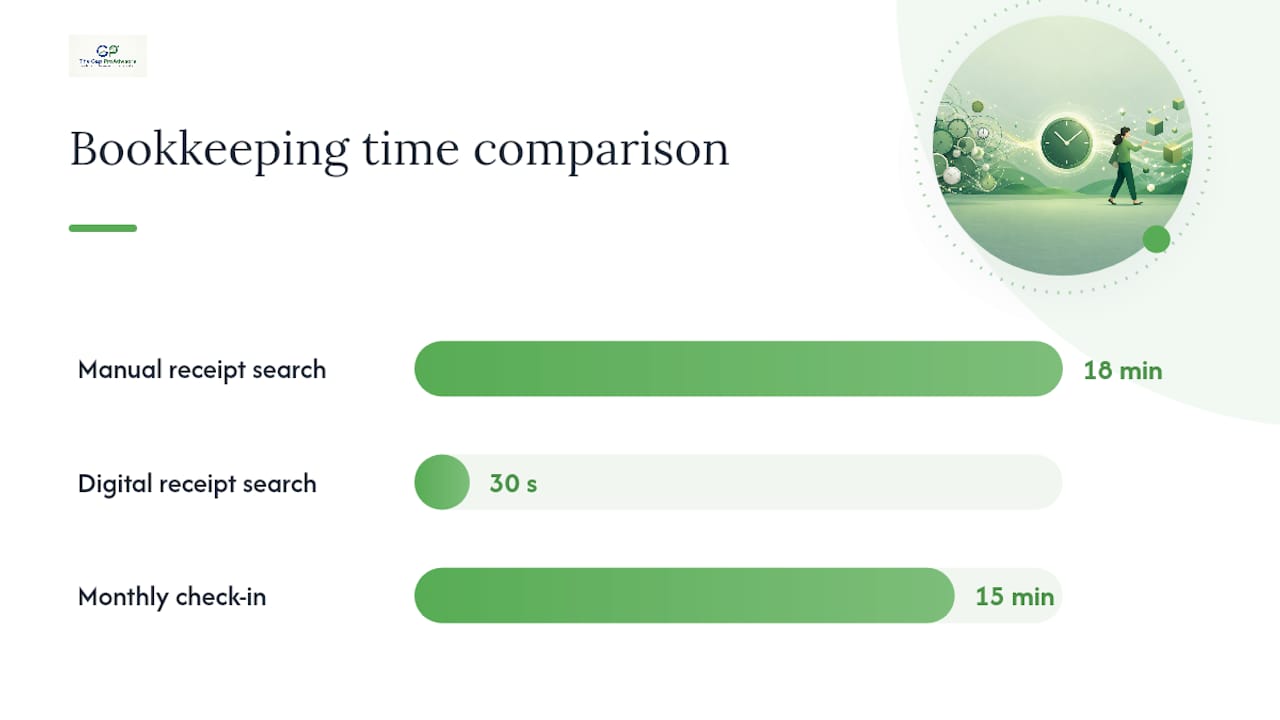
Pro Tip: Set a recurring 15-minute monthly check-in with your bookkeeper to review the exceptions list. It catches small issues before they become a January headache.
What a Virtual Bookkeeper Actually Does
Knowing the task list helps you scope conversations with providers and spot gaps before you sign anything.
Daily and weekly work:
- Categorizing transactions as they hit your bank and credit accounts
- Reconciling bank and credit card statements against your books
- Matching receipts to transactions for audit-ready records
Monthly deliverables:
- Profit and loss statement
- Balance sheet
- Reconciliation reports for every account
- An exceptions list for anything that needs your decision
Periodic responsibilities:
- Payroll prep inputs (hours, classifications, deductions) handed to your payroll provider
- Sales-tax support, including tracking taxable transactions by jurisdiction
- Year-end cleanup to prepare your books for your CPA
What a virtual bookkeeper typically does not do matters just as much. Tax strategy, entity structuring, and CFO-level financial planning belong with a licensed CPA or tax professional. Legal compliance questions belong with an attorney. A bookkeeping virtual assistant keeps your records clean and current; it doesn't replace the strategic guidance a tax preparer or planner provides.
Signs You're Ready to Hire a Virtual Bookkeeper
You don't need to wait until your books are a disaster to make the switch. A few signals tell you it's time sooner than that.
- Your books are more than a month behind. If you can't answer "what's my cash position right now?" without digging, that's a red flag.
- You're spending owner hours on data entry. Every hour categorizing transactions is an hour not spent selling or serving customers.
- Invoices are going unpaid longer than they should. A backlog in accounts receivable often means nobody's tracking it closely enough.
- Your CPA leaves cleanup notes every year. If your accountant spends billable hours fixing your categorization before they can file, you're paying twice for the same work.
- You're scaling fast and can't keep pace manually. A remote agency doubling its client roster or a seasonal retailer heading into a busy quarter both hit this tipping point quickly.
The cost-effectiveness of outsourcing kicks in the moment the time you or your staff spend on bookkeeping costs more than the service itself. That's often sooner than owners expect.
Start small if you're unsure. Pilot a single stream, like bank reconciliation or accounts receivable, for one to two months. Measure the hours you get back and whether reporting actually improves before expanding the relationship.
Pro Tip: During evaluation, ask directly about turnaround time, access permissions, and security protocols. A provider who can't answer clearly on all three isn't ready for your books.
Tools, Automation, and Security: What to Require
The right software stack turns virtual bookkeeping from a monthly report into an always-current dashboard. A few categories matter more than the rest.
Platform categories to expect:
- Cloud accounting software (QuickBooks Online is the most common)
- Receipt capture apps that sync directly with your books
- Payment processor integrations for accurate revenue tracking
- Payroll integrations that eliminate duplicate data entry
Automation features worth prioritizing:
- Bank feed connections that import transactions automatically
- Categorization rules that learn from repeated vendor patterns
- Invoice automation for recurring billing
- Reconciliation aids that flag mismatches before month-end
Security deserves equal attention. A properly run engagement includes role-based access so your bookkeeper only sees what they need, two-factor authentication on every login, a signed confidentiality agreement, and an audit log that tracks every change made to your records.
One practical benchmark: providers who set approval thresholds, granting record-and-reconcile access while keeping payment authorization internally, tend to minimize fraud risk without slowing down the monthly close.
Integrations with your bank, payroll system, and payment platforms are what make CPA handoffs painless. For a deeper look at how routine accounting tasks hold up through a busy filing season, MyBizApps breaks down the process small businesses use to keep books tax-ready year-round.
How The Gap ProAdvisors Delivers Remote Bookkeeping
Mygappro built its remote bookkeeping model around the same principles covered above: cost savings, real-time access, and clean handoffs to your tax preparer. Services include:
- Accurate, ongoing bookkeeping with monthly reconciliation and reporting
- Payroll processing alongside your books, not as a separate disconnected system
- Tax preparation and year-round tax planning coordinated with your bookkeeping records
- A secure client portal for document exchange and financial visibility
Most clients move through an initial assessment, a books clean-up if needed, then settle into a recurring monthly cadence within the first few weeks. Small business owners working with Mygappro have reported meaningful savings and less stress around tax time, particularly once their books are current enough to support proactive tax planning rather than reactive filing. As with any financial services relationship, ask direct questions about scope, turnaround, and access during your evaluation before signing on.
When Virtual Bookkeeping Becomes a Strategic Advantage
Cost savings get you in the door. What keeps businesses committed to virtual bookkeeping long-term is what clean books unlock once the basics are handled.
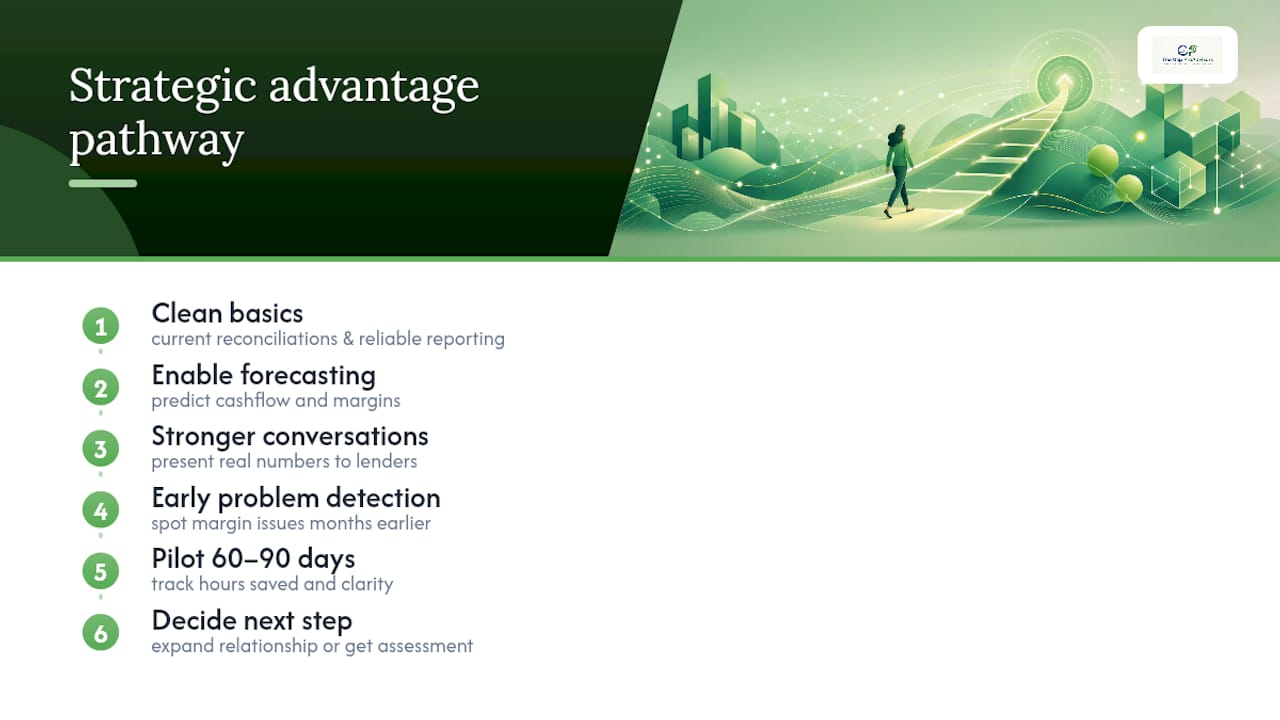
Once your reconciliations are current and your reporting is reliable, you can actually forecast. You can walk into a lender conversation with real numbers instead of estimates. You can spot a margin problem in March instead of discovering it in your December tax bill. That shift, from reactive cleanup to forward-looking planning, is where the real value lives.
My recommendation: pilot one bookkeeping stream for 60 to 90 days. Track the hours you get back and whether your financial picture actually gets clearer. If it does, expand the relationship. If you want a sense of what that could look like for your specific situation, a personalized assessment is a reasonable next step before committing further.
— Angela
Get Started With Remote Bookkeeping Built for Small Businesses
Flat-rate remote bookkeeping services are designed around benefits such as lower overhead than a full-time hire, monthly reporting you can rely on, and a secure portal to keep your data protected without slowing you down. Unlike managing an in-house hire, you're not covering benefits, training, or turnover risk.
Getting started is straightforward: a quick assessment of your current books, a clean-up phase if needed, then a recurring monthly cadence that keeps your reporting current year-round. Some providers coordinate payroll and tax preparation alongside bookkeeping, helping prevent gaps between services. If you're ready to see what flat-rate remote bookkeeping looks like for your business, explore small business bookkeeping services and request your assessment today.
Sources
- Bookkeeping, Accounting, and Auditing Clerks — U.S. Bureau of Labor Statistics
- Virtual bookkeeping: What it is, how it works, and key benefits — KVIA / Stacker (republished content)
- Bookkeeping virtual assistant: Cost, scope & how to hire — Oceans Talent
- How to go paperless with accounting documents — CleanTably
FAQ
How much does a virtual bookkeeper make?
Bookkeeping and accounting clerks earn a median salary near $49,210 a year, according to BLS data, though virtual bookkeeping firms and independent contractors often set their own rates based on client volume and specialization.
Is virtual bookkeeping profitable for the businesses that offer it?
Virtual bookkeeping firms can be profitable because they serve multiple clients using shared systems and automation, spreading overhead across a client base rather than absorbing the full cost of a single in-house employee.
Is being a virtual bookkeeper hard?
It requires solid attention to detail, comfort with cloud accounting software, and the discipline to manage multiple clients' reconciliations and deadlines simultaneously, but it's a learnable skill set rather than an inherently difficult one.
Is there high demand for virtual bookkeepers?
Small business owners increasingly prefer remote bookkeeping support over in-house hires because of the cost savings and flexibility it offers. This keeps demand for virtual bookkeeping services steady across industries.
What's the difference between a virtual bookkeeper and a CPA?
A virtual bookkeeper handles recurring transaction categorization, reconciliation, and monthly reporting, while a CPA handles tax strategy, filings, and higher-level financial planning; Mygappro coordinates both so your books and your tax preparation stay aligned.