
TL;DR:
- MileIQ offers simple, highly accurate mileage tracking ideal for solo owners with basic needs. Everlance provides additional expense management features, making it suitable for businesses with more complex bookkeeping. Choosing depends on whether the focus is solely on mileage logs or includes expense tracking and team management.
For most solo small-business owners in Mississippi who only need clean mileage logs, MileIQ is the simpler, more reliable choice. If you also need expense tracking, receipt capture, and bank syncing in one place, Everlance delivers more bookkeeping value per dollar. Both apps export IRS-compliant logs in PDF and CSV formats, which your bookkeeper or tax preparer will need for Schedule C and reimbursement records.
Quick profiles: a solo realtor or service tech who just wants automatic drive logging and a tidy year-end report fits MileIQ well. A freelancer or 1099-heavy operation managing receipts, multiple expense categories, and QuickBooks Online reconciliation will get more done with Everlance. Either way, the app you pick should feed clean, classified data directly into your bookkeeping workflow.

Table of Contents
- MileIQ vs Everlance: side-by-side comparison for bookkeepers
- How does each app handle automatic drive detection?
- Which app reduces your bookkeeping workload on expenses?
- What does each app actually cost, and when does the free tier run out?
- How do you choose the right app for your business?
- How should a remote bookkeeper handle mileage data from these apps?
- Key Takeaways
- What clients actually experience when they outsource
- Prefer to hand this off entirely? Here's what that looks like
- Useful sources
- FAQ
MileIQ vs Everlance: side-by-side comparison for bookkeepers
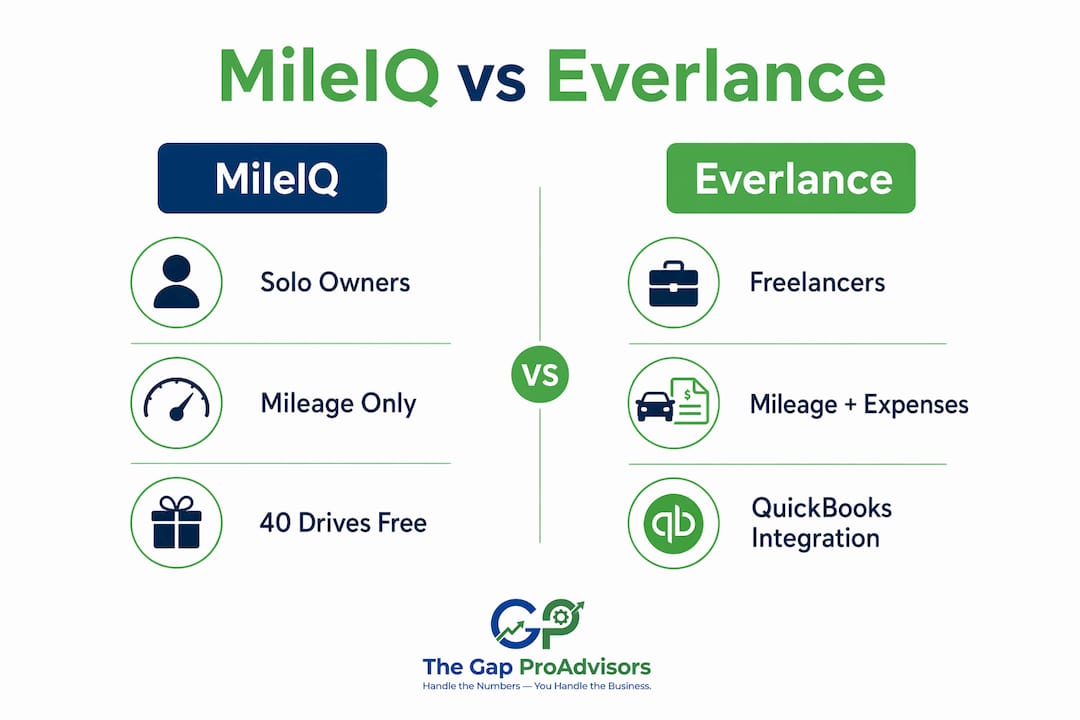
G2's 2026 market comparison positions MileIQ as the benchmark for pure automated mileage accuracy and Everlance as the all-in-one tool that adds expense management and bank integration.
| Dimension | MileIQ | Everlance | Edge |
|---|---|---|---|
| Best for | Solo owners, mileage-only needs | Freelancers, 1099 contractors, expense-heavy businesses | Depends on workflow |
| Auto-detection accuracy | Excellent; rarely misses suburban/highway drives | Good; manual "Start Tracker" mode adds control | MileIQ for hands-off accuracy |
| Trip classification & editing | Simple swipe (business/personal); fast edits | Swipe + merge/multi-day options; more editing flexibility | Everlance for complex trips |
| Expense management & receipt OCR | None | Built-in (Premium Plus tier) | Everlance |
| QuickBooks Online & exports | PDF/CSV; limited category filters on mobile | PDF/CSV + Xero, QuickBooks, FreshBooks export | Everlance |
| Team/multi-user & reimbursements | Teams Lite/Teams/Teams Pro plans | Team plan with admin dashboard | Both; Everlance for larger teams |
| Reporting & IRS-ready logs | Clean, compact; web dashboard for filters | Detailed; receipts attachable to exports | Everlance for richer reports |
| Free-tier limit | 40 drives/month | 30 auto-tracked trips/month | MileIQ |
| Paid pricing (individual) | a monthly or annual fee for unlimited drives | a monthly or annual fee with tiered plans offering varying features | Everlance Starter is cheaper annually |
| Customer support (G2, 2026) | a moderate customer support rating | a high customer support rating | Everlance |
| Security & privacy | Cloud-based; Microsoft-backed | Cloud-based; encrypted data storage | Comparable |
| Offline functionality | Inconsistent; requires active connection at trip start | Better offline tolerance with manual entry fallback | Everlance |
| Platform compatibility | iOS, Android, web | iOS, Android, web | Tied |
| Trial availability | Free tier (40 drives); no separate trial | Free tier (30 auto trips) + free trial available | Everlance |
How does each app handle automatic drive detection?
MileIQ is the stronger choice for core mileage accuracy on standard suburban and highway routes. It runs quietly in the background, uses GPS combined with Wi-Fi and cell data, and detects drives over half a mile automatically. That half-mile minimum is also its main limitation: short hops between job sites can go unlogged.
Common strengths and failure modes:
- MileIQ strengths: Rarely misses regular commutes; low battery drain; minimal setup; simple swipe classification.
- MileIQ failure modes: Misses trips under half a mile; unreliable when a trip starts without an active internet connection; no offline mode for remote job sites.
- Everlance strengths: Multiple detection modes (auto, manual, Start Tracker); better for gig workers who stop frequently; more editing options for multi-day or merged trips.
- Everlance failure modes: Some users report missed short trips when "Start Tracker" mode is not enabled; higher battery usage on heavy travel days; occasional notification overload.
Both apps allow manual entry for any missed drive, and both vendor guidelines emphasize that automatic detection is not "set-and-forget." MileIQ's own documentation recommends reviewing and classifying trips regularly to keep records IRS-defensible.
Pro Tip: Ask your clients to export one full month of raw drive logs at the end of each month, not just at tax time. Cross-reference the trip count against their calendar or mileage odometer notes. A 10% discrepancy is a red flag worth investigating before the IRS asks.
Which app reduces your bookkeeping workload on expenses?
Everlance cuts more bookkeeping steps for owners who track both mileage and expenses. MileIQ tracks mileage only, so any expense reconciliation still requires a separate tool or manual entry in QuickBooks Online.
| Feature | MileIQ | Everlance (Starter) | Everlance (Pro/Premium Plus) |
|---|---|---|---|
| Receipt capture / OCR | None | None | Yes |
| Bank account sync | None | None | Yes |
| Expense categorization | None | None | Yes |
| QuickBooks / Xero export | CSV/PDF only | CSV/PDF only | Direct integration |
| Schedule C export | Via CSV | Via CSV | Built-in report |
A practical example: a Mississippi-based HVAC contractor with 15 client visits per week and a mix of fuel, supply, and tool receipts would spend significant time manually entering expenses into QuickBooks if using MileIQ alone. With Everlance Premium Plus, bank-feed import and receipt OCR handle most of that categorization automatically, reducing the reconciliation touchpoints your bookkeeper has to correct each month. For owners who want to understand how expense consolidation fits into a broader small business accounting workflow, that reduction in manual data entry is where the real time savings show up.
What does each app actually cost, and when does the free tier run out?
The practical cost tradeoff is straightforward: MileIQ is cheaper for mileage-only users; Everlance's bundled expense features change the value calculation for anyone doing real bookkeeping.
Free-tier reality check:
- MileIQ's free plan covers a limited number of drives per month. A realtor doing 3 showings a day hits that cap in two weeks.
- Everlance's free tier limits automatic tracking to 30 trips per month. A gig driver working five days a week can exhaust that in one week.
- Neither free tier is realistic for full-time business use. Evaluate them as a testing window, not a long-term plan.
Subscription comparison:
- MileIQ individual: a monthly or annual fee for unlimited drives (unlimited drives).
- Everlance Starter: $8.99/month or $69.99/year (mileage + basic reporting).
- Everlance Pro: $99.99/year (adds expense tracking, receipt OCR, bank sync, tax tools).
- MileIQ Teams Lite: $8/user/month; Teams: $9/user/month; Teams Pro: $10/user/month.
Independent reviews confirm that annual pricing for both apps overlaps closely, but Everlance Pro bundles features that would otherwise require a separate expense app. If you are already paying for a standalone receipt tool, Everlance Pro often costs less in total. Reviewing budgeting app comparisons can help you see where mileage and expense tools fit into your overall financial toolkit.
How do you choose the right app for your business?
Work through these questions before committing to a paid plan:
- What is your primary need? Mileage logs only → MileIQ. Mileage plus expenses, receipts, and bank sync → Everlance.
- How many drives do you average per month? Under 40 → test MileIQ's free tier. Under 30 auto-trips → test Everlance's free tier. Over either cap → budget for a paid plan from day one.
- Do you use QuickBooks Online? Everlance's direct export to QuickBooks reduces manual import steps. MileIQ requires CSV import.
- Do you have a team or 1099 contractors? Everlance's admin dashboard and centralized reporting handle contractor reimbursement workflows more cleanly than MileIQ's Teams Lite plan.
- Do you work in areas with spotty cell service? MileIQ's offline mode is inconsistent. Everlance handles gaps better with manual entry fallback.
During your 14–30 day trial, test these scenarios:
- Export one full month of drives as CSV and open it in Excel. Confirm all columns match what your bookkeeper needs.
- Simulate a bank import (Everlance Pro) and verify categories map correctly to your QuickBooks chart of accounts.
- If you have multiple drivers, run a multi-driver report and confirm admin visibility works as expected.
- Ask your bookkeeper to review one exported log before you commit. Their feedback on format and completeness matters more than the app's marketing copy.
How should a remote bookkeeper handle mileage data from these apps?
The right intake process starts with a raw export, not a screenshot. Request a CSV or PDF log at the end of each month, reconcile it against the client's odometer notes or calendar, and attach any supporting receipts before closing the period.
Bookkeeper workflow checklist:
- Request monthly CSV exports in the first week of the following month.
- Confirm trip count against client's own estimate or odometer log.
- Flag unclassified or "personal" trips that look like business drives for client review.
- Attach receipt images (Everlance) or note business purpose in a separate annotated log (MileIQ).
- Reconcile mileage totals against fuel expense entries in QuickBooks Online.
- Archive the final monthly CSV separately from the QuickBooks file for audit readiness.
Both apps produce IRS-compliant PDF and CSV exports suitable for Schedule C and reimbursement records, but Everlance's richer filters make it easier to isolate specific vehicles, date ranges, or expense categories during an audit. For clients using MileIQ, the web dashboard provides more filtering options than the mobile app alone.
When a client's mileage data is inconsistent or their classification habits are poor, that is the right moment to discuss a managed service. Mygappro's remote bookkeeping and tax services include QuickBooks Online reconciliation and mileage log review as part of the monthly workflow.
Pro Tip: Retain a separate annotated mileage log each month that notes the business purpose of each trip in plain language. A raw GPS log alone does not satisfy IRS substantiation rules. The annotation is what makes the record defensible.
Key Takeaways
MileIQ wins on mileage simplicity; Everlance wins on bookkeeping consolidation, and the right choice depends on whether you need expense tracking alongside your drive logs.
| Point | Details |
|---|---|
| Mileage-only users | MileIQ's automatic detection and 40-drive free tier suit solo owners who only need IRS-ready mileage logs. |
| Expense-heavy businesses | Everlance Pro bundles receipt OCR, bank sync, and QuickBooks export, reducing manual reconciliation steps. |
| Free-tier limits | MileIQ caps at 40 drives/month; Everlance caps at 30 auto-tracked trips. Neither is viable for full-time business use. |
| Support & reporting | Everlance scores a high customer support rating vs. MileIQ's a moderate customer support rating on G2 for customer support, and offers richer export filters. |
| Managed alternative | Mygappro handles mileage reconciliation, QuickBooks Online cleanup, and tax prep for owners who prefer to outsource. |
What clients actually experience when they outsource
Most small-business owners who come to us have already tried one of these apps. The pattern is consistent: the app works fine for logging drives, but the monthly reconciliation, the trip classification cleanup, and the QuickBooks import still take more time than expected.
Owners who switch to a managed workflow with Mygappro typically stop worrying about whether their mileage log will hold up under IRS scrutiny. The reconciliation happens monthly, the exports are reviewed by a professional, and the QuickBooks file stays clean. For 1099-heavy operations, that monthly discipline also keeps contractor reimbursement records audit-ready year-round.
The honest answer is that both MileIQ and Everlance are good tools. But a tool only saves you time if you use it consistently and correctly. When that consistency breaks down, a managed bookkeeping service is the more reliable path to accurate records and maximum deductions.
Prefer to hand this off entirely? Here's what that looks like
Mygappro gives small-business owners in Mississippi a clear alternative to managing mileage apps on their own. When you start with Mygappro, the onboarding process covers data intake from your existing mileage app (MileIQ or Everlance), vehicle and mileage reconciliation, and full QuickBooks Online consolidation. You get a clean, IRS-ready set of books each month without touching a CSV file yourself.

The process is straightforward: share your app exports through a secure online portal, and the team handles classification, reconciliation, and tax preparation. Mygappro also supports 1099 contractor filing and payroll, so your entire financial workflow stays in one place. Schedule a free consultation at mygappro.com to see exactly what a managed bookkeeping engagement covers for your business.
Useful sources
- G2: Compare Everlance vs MileIQ — User ratings, support scores, and feature comparisons from verified business users; the most reliable third-party benchmark for this decision.
- MileIQ official site — Vendor documentation on detection logic, IRS compliance guidance, and current pricing; check here during any trial because plan details change.
- Everlance official site — Authoritative source for free-tier limits, Premium Plus feature gating, and bank-sync capabilities.
- Freelance AI Daily: Is MileIQ Still Worth It in 2026? — Independent review covering pricing changes, missed-trip reports, and the value comparison between both apps for freelancers.
- Gridwise blog: Everlance comparison — Useful for gig-worker and contractor-specific use cases and the mileage-only vs. expense-bundled decision split.
Pricing and plan limits on vendor sites change frequently. Always verify current figures directly on the vendor's pricing page before committing to a subscription.
FAQ
Is MileIQ or Everlance better for a small business?
MileIQ is better for owners who need simple, accurate mileage logs. Everlance is the stronger choice when you also need expense tracking, receipt capture, and QuickBooks export in one subscription.
What are the free-tier limits for each app?
MileIQ's free plan covers up to 40 drives per month; Everlance's free plan covers 30 automatically tracked trips per month. Both caps are too low for full-time business use.
Do both apps produce IRS-compliant mileage logs?
Yes. Both MileIQ and Everlance export IRS-compliant logs in PDF and CSV formats suitable for Schedule C and reimbursement records, though Everlance offers richer filtering and receipt attachment options.
How does Everlance integrate with QuickBooks Online?
Everlance's Pro and Premium Plus tiers support direct export to QuickBooks, Xero, and FreshBooks. MileIQ requires a manual CSV import into QuickBooks Online.
When should I outsource mileage tracking to a bookkeeper?
When your monthly reconciliation takes more than an hour, your classification habits are inconsistent, or you have multiple drivers and 1099 contractors, a managed service like Mygappro is more reliable than a DIY app workflow.